








Daily Maintenance Checklist: How to Extend the Lifespan of Your Arcade Machines
Ensure your arcade machines run smoothly with DINIBAO’s daily maintenance checklist. Follow expert tips on the arcade machine maintenance checklist to extend lifespan, reduce downtime, and boost performance. Keep your gaming business thriving with reliable care routines from DINIBAO.
For any arcade operator, from a large Family Entertainment Center (FEC) to a boutique mall zone, downtime is the enemy of profit. A machine with an "Out of Order" sign doesn't just lose money for that hour—it damages your brand's reputation.
The secret to a profitable arcade business isn't just buying high-quality machines from a reliable manufacturer like Dinibao; it’s about maintaining them. A consistent arcade machine maintenance checklist can extend the lifespan of your equipment by years, ensuring high resale value and continuous revenue.
Whether you operate claw machines, VR simulators, or racing car games, use this daily checklist to keep your zone running smoothly.
Why Daily Maintenance Matters for Your ROI
Before we dive into the steps, let’s look at the numbers. Industry data suggests that preventative maintenance can reduce emergency repair costs by up to 40%.
-
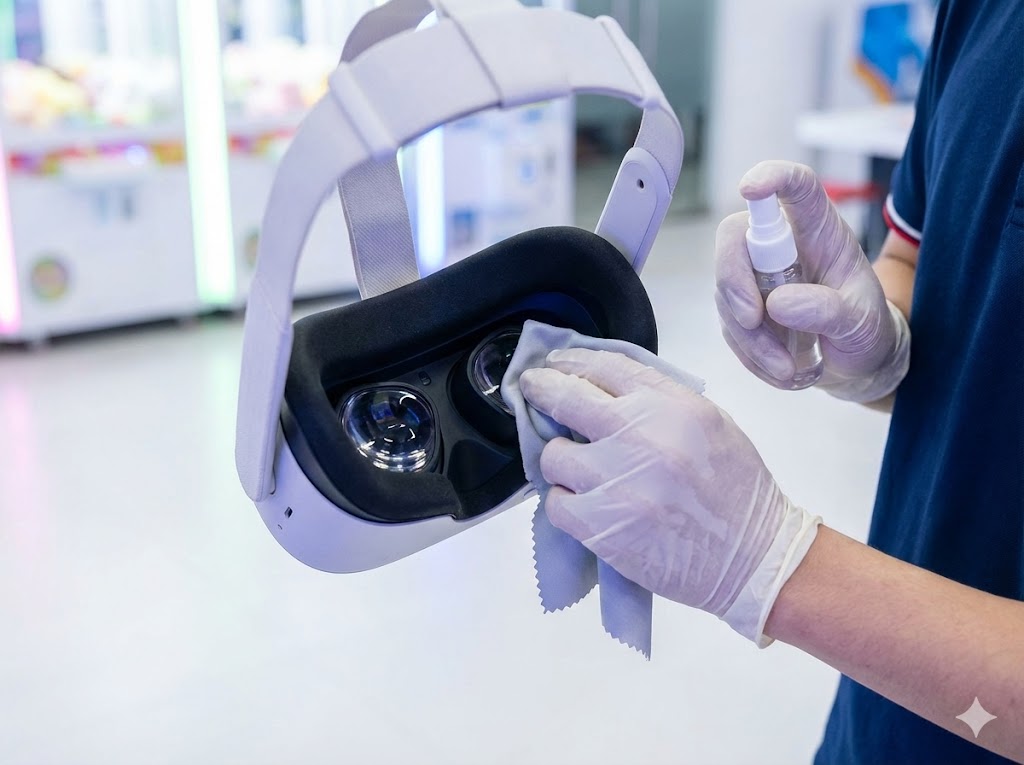
Customer Experience: Sticky buttons or blurry VR lenses frustrate players, leading to bad reviews.
-
Longevity: Dust is the #1 killer of electronics. Regular cleaning prevents overheating and board failure.
-
Revenue Protection: A well-maintained coin acceptor ensures you never miss a sale.
The Ultimate Daily Arcade Machine Maintenance Checklist
Assign these tasks to your staff as part of their opening or closing routine. It takes less than 30 minutes but saves thousands in the long run.
1. Power-Up & Visual Safety Inspection
-
Check Power Cords: Ensure all plugs are secure and not frayed. For motion simulators (like VR racing cars), check that cables aren't being pinched by the moving platform.
-
Test Emergency Stops: For heavy-duty amusement rides, press the emergency stop button to verify it cuts power immediately. Safety is your top priority.
-
Inspect Cabinet Exteriors: Look for cracked plastic, loose screws, or sharp edges that could injure a customer.
2. Hygiene & Surface Cleaning (Crucial for VR)
Post-pandemic players are hyper-aware of hygiene.
-
Sanitize Controls: Use non-alcoholic wipes to clean joysticks, buttons, and steering wheels. Accumulated sweat and oil cause buttons to stick over time.
-
VR Headset Care: This is critical for VR theme parks. Use a microfiber cloth and specific lens cleaner to wipe VR lenses. Never use paper towels, as they scratch the lenses. Replace the disposable face masks/covers daily.
-
Glass & Screens: Fingerprints on a claw machine glass hide the prizes and lower the desire to play. Use a streak-free glass cleaner to keep the showcase crystal clear.
3. Functional Testing: "Play Your Games"
The best way to find a problem is to play the game yourself.
-
Coin/Card Mechanism Test: Drop a coin or swipe a card on random machines to ensure credits register instantly. Coin jams are the most common reason for revenue loss.
-
Claw Strength Check: For crane machines, test the claw’s grip. If it feels too loose or the string looks frayed, it needs immediate adjustment.
-
Sound & Lighting: Attract mode is your marketing. Ensure all LED strips are working and the volume is at an appropriate level to attract attention without being deafening.
Weekly Deep-Dive: Prevention over Cure
Once a week, go beyond the surface:
-
Vacuum Internal Dust: Open the service door and vacuum the bottom of the cabinet. Dust bunnies can block fans and cause the game board (PCB) to overheat.
-
Check Hydraulic/Electric Cylinders: For dynamic cinema or racing simulators, listen for squeaking sounds during operation. This often indicates a need for lubrication.
-
Software Updates: Check if your VR content needs a software update to fix bugs or add new games.
FAQ: Common Arcade Maintenance Questions
Here are answers to the most frequent questions we get from operators.
Q1: How do I fix sticky arcade buttons without replacing them?
A: Sticky buttons are usually caused by a buildup of sugary drinks or dirt. often, you don't need to replace them. Turn off the machine, then use a contact cleaner (safe for plastics) sprayed around the button's edge. Press it rapidly to work the cleaner in. If it’s still sticky, you may need to open the panel and clean the microswitch with a cotton swab and rubbing alcohol.
Q2: How often should I clean my VR arcade equipment?
A: VR headsets should be wiped down after every single user to prevent the spread of bacteria and eye infections. A deep clean of the straps and foam padding should happen daily at closing.
Q3: Why is my claw machine claw not grabbing tightly?
A: If the claw descends but has zero grip, check the voltage settings on the main board (refer to your manual). Over time, the coil wiring can also loosen. If the string is fraying, it might be getting stuck in the pulley, preventing the claw from closing fully.
Q4: What is the best way to prevent monitor burn-in on arcade screens?
A: Most modern machines use LCDs, which are less prone to burn-in than old CRTs, but it can still happen. Ensure your machines are set to "Attract Mode" (where the screen image constantly changes) rather than displaying a static "Insert Coin" image for hours.
Q5: Where can I buy spare parts for Dinibao machines?
A: We recommend keeping a "First Aid Kit" of spare parts, including extra buttons, microswitches, and coin mechanisms. You can order original, high-quality spare parts directly from the Dinibao support team to ensure perfect compatibility.
Conclusion
Consistent maintenance is the difference between a struggling arcade and a thriving entertainment center. By following this daily maintenance checklist, you ensure your machines are always ready to delight customers and generate revenue.
Looking for durable, low-maintenance arcade machines? Contact Dinibao today to explore our range of premium VR simulators and prize machines designed for heavy commercial use.
Recommended for you


Maze treasure hunter
What support do you provide after purchase?
We offer a 1-year warranty, lifetime technical support, and detailed manuals and video guides. Spare parts and remote troubleshooting are also available anytime.
Sports star
Can the difficulty be adjusted?
Yes. Operators can fine-tune gameplay settings to balance challenge and reward.
Ticket arcade machine
How do I redeem tickets?
Collect printed tickets from the outlet and exchange them at the prize counter or self-service redemption station.
Cyberpunx
Are the guns safe?
Yes. They are infrared toy guns, not projectile weapons, with a safe and hygienic sanitizing system.
beat beans
What age group is Beat Beans suitable for?
Beat Beans is designed for children ages 3 and up, making it a perfect family-friendly arcade game.
Air hockey machine
What is an air hockey arcade machine?
An air hockey arcade machine is an interactive game where two players use paddles to hit a puck across a smooth table surface. A cushion of air is blown through tiny holes to reduce friction, allowing the puck to glide quickly.
You May Also Like
Get in Touch with us
If you are interested in our products and services, please leave us messages here to know more details.
We will reply as soon as possible.

 Scan QR Code
Youtube
Guangzhou DiniBao Animation Technology Co., Ltd
Guangzhou Dinibao Animation Technology Company Co., Ltd